This article has been cross-published on Medium.com
What does “conversion optimization” mean? We first need to answer this question before discussing the relation between conversion optimization and user experience.
Conversion optimization (or conversion rate optimization — CRO) is the sum of optimization activities that aim to maximize the occurance of user activities on your site or app which contribute to the success of your business.
Let me give you some examples about “user activities” that you can optimize:
- making a purchase (for an ecommerce site)
- increasing the number of readers who read articles fully (for a news site)
- completing a game level (for a mobile gaming app)
- increasing the number of customers who use internet banking (for a financial institution)
- increasing the number of members (for a dating site)
- submitting a contact information form (for a lead generation site)
- increasing the email subscription rate (for a blogger)
The most important thing for us is to know which “user activity” to optimize. This “user activity” can be directly related to the growth of our business (eg. increase in sales, increase in revenue, decrease in churn rate, increase in membership sign-ups) or it can indirectly impact our business results (eg. increase in users watching product videos for an ecommerce site, increase in Twitter followers etc).
For those interested in understanding different conversion types better and setting goals for the business, I recommend Avinash Kaushik’s article about macro & micro conversions.
Improve User Experience Before Focusing on Conversion Optimization
In some articles on BoostingConversion.com (my personal business blog) I am going to use the term “user experience optimization” instead of “conversion optimization”. This is because I believe it is more important to focus on the user experience first instead of purely focusing on the conversion optimization. When you check ten things Google knows to be true you’ll see this principle on the top:
Focus on the user and all else will follow”
This isn’t a coincidence. Google knows it very well that if you don’t position the user at the core of your company’s reason for existence, you cannot talk about long term success and sustainability. Same mentality applies to the discipline of “conversion optimization”. You cannot talk about optimizing your conversions or business results without optimizing your site or app for the user experience.
If you are focused on your user and prioritize your optimization efforts for the user experience, but still see decreasing conversion rates or non-improving business results, you might want to revisit how you defined your goals or conversions. Being non-optimized for the correct metric (and striving to optimize it) is much more important than being optimized for the wrong metric.
Sustainable Success vs Short Term Revenue
The screenshot below is from the homepage of one of the most popular news sites in Turkey. The headline of the news article (in the carousel) says: “Are schools cancelled due to bad weather?”

And the following screenshot is from the detail page you see after clicking the headline link on the homepage. The title of the news article on the detail page is the same — they repeat the same question: “Are schools cancelled due to bad weather?”. But when you scroll down, you’ll find the information you are trying to reach: “Governorship of Istanbul announced that schools will be open tomorrow”:

By not showing the key information (that the user looks for) in the headline on the homepage, this news site tries to motivate the user to click the headline and read the news article on the detail page. Their aim is to increase their pageview (PV) numbers (actually, they double the PV per user by forcing the user to click the headline to get the news).
Besides, they want their users to scroll down the detail page by not showing the key information in the headline on the detail page. With this approach, they try to optimize their user engagement metrics in the short term (eg. percentage of users who scroll down, percentage of users who stay on the site longer than average etc.)
To summarize, this news site tries to optimize for the following metrics: Number of Pageviews and Percentage of Users Who Scroll Down (and similar User Engagement Metrics)
These short term focused optimization efforts aim to increase the advertisement revenue since content monetization models in today’s world are positively correlated to the pageview metric.
So, what is wrong with this approach?
We can say that this news site is successful in optimizing their conversion rate for the “short term”, but they risk their long term success and sustainability since they are not focused on optimizing the user experience. Although it is possible to provide the relevant information to users on the homepage, they force users to stay more on the site by visiting more pages to reach to the information they look for.
Users consistently compare their experiences on different sites and tend to visit sites or use apps more which provide a more efficient experience for them. In this case, users will shift to visiting other news sites which provide a more effortless experience for them. That’s why the exemplified news site will lose their users in the long term although they optimize their ad revenues in the short term. The lesson here:
If you don’t optimize your site or app for the user experience first, you will lose the game in the long term although you might have short term wins.
Risking Long Term Success and Sustainability for Short Term Focused Optimizations
The screenshot below is from BuddyTV.com. This site shares good quality content about movies and TV series. When you click any link on the homepage (to read an article or to see a slideshow), you are welcomed by a pop-up screen asking you to try “Amazon prime instant video” — a service offered by their advertiser partner.
Consider that you are not interested in such a service, and you want to get rid of this pop-up screen, a new challange waits for you. It is not that easy to close this pop-up window. No, you cannot close it by clicking any other space outside the pop-up window.
Yes, you’re right, there is no “X” or “Close” button on top right corner of the pop-up box, too. The only option to get rid of this advertisement is either to click “Try now for free” button or to click “I don’t want free streaming” link which is hardly realizable.
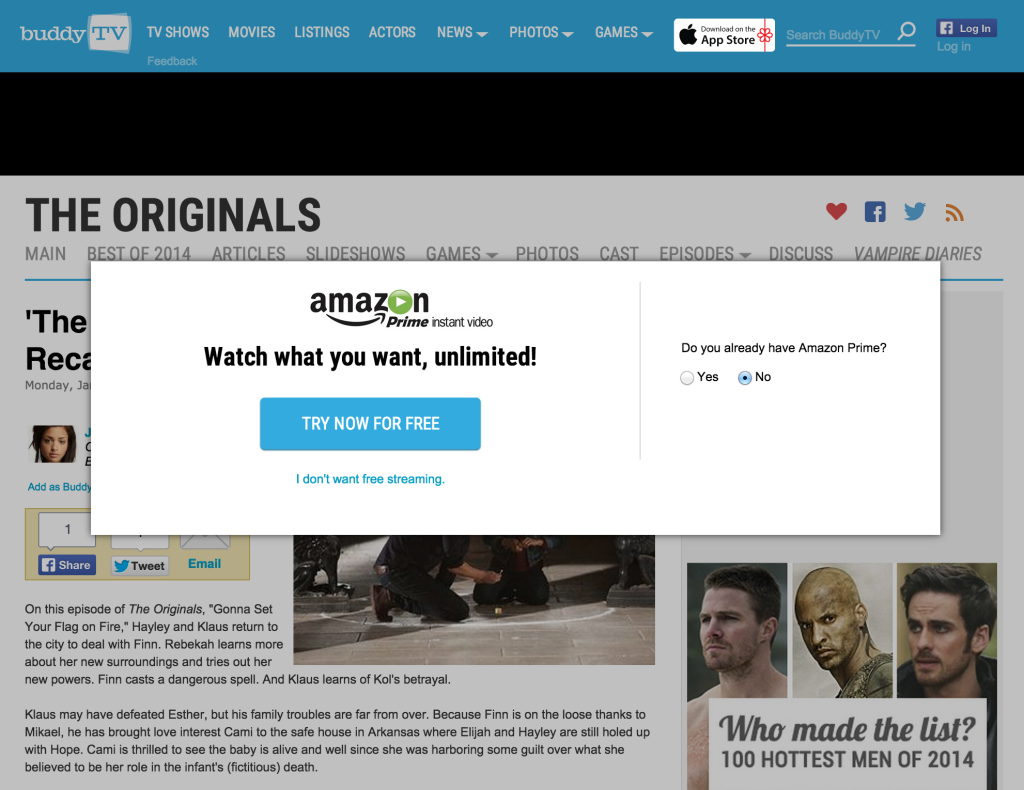
Let’s assume that you succeeded in closing this pop-up screen, and having the joy of this little achievement, you want to focus on reading your article. But what is that? After your first “scroll activity” (even before finishing to read your first paragraph), the site asks another thing from you. This time they want you to like them. Yes, this is true. THEY WANT YOU LIKE THEM without allowing you to engage with their content.
It is not very difficult to anticipate the potential user reaction here. This is a great example of why Facebook still haven’t launched a “DISLIKE” button.

BuddyTV.com tries to optimize their business for two metrics: Advertisement revenue (macro goal) and number of Facebook likes(micro goal) – another example for the short term focused business perspective. This strategy can help you to optimize your conversions in the short term, but you will lose in the long term since you don’t optimize for the user experience.
There are tons of companies / organizations in the world that risk their long term success and sustainability for their short term business results. My advise to company executives or content creators:
Optimize the user experience before anything else (eg. before optimizing the conversion rate)
If you don’t focus on your users first being obsessed with your short term revenues, your “user focused” competitors will overcome you, and you will lose the game. Never forget this:
Rules of the game in this digital world are set by users and they are much more powerful than you think.
Please feel free to share your examples of companies focused on optimizing the user experience or obsessed with optimizing their short term conversions.